
English
Security model
Every outside connection to Neutrino Hub goes through one TCP port, which is 8443 by default. Devices with a join link connect to this port with the Noise protocol, and browsers with a share link connect to it with WebRTC. Every other connection receives no data.
Quick answers
| Question | Answer |
|---|---|
| Who can connect to this port | After you turn on Direct, SSH relay, SakuraFrp or OpenFrp, any host on the internet can open a TCP connection. Only connections that hold a link pass the checks. |
| What can someone without a link see | The hub sends these connections no data, holds each one for a random time, then resets it. A scanner detects only an open port and cannot identify the service. |
| Can others sign up or join | The hub has no sign-up feature. A device must use a join link that you generate in the panel. The link is valid for 30 minutes and works one time. |
| Can third-party servers read the content | No. Through SakuraFrp, OpenFrp, NetBird, EasyTier or your VPS, the device and the hub remain the two ends of the encryption. Those servers and routes determine whether the connection stays up and how fast it is. |
| What if a share link leaks | Anyone with the link can open this app until the share ends. The link has no limit on the number of people and records no visitor identity. If you find a leak, select Revoke, and the connections close immediately. |
| What can a share link open | Only the one shared app. It cannot open the panel, a terminal or files. What a visitor can do inside the app depends on the app: code-server has a terminal, so a visitor can access every file that the account running it can access. |
| Can strangers exploit a bug in an app | Not through the connection port. A client without authorization cannot see this app or open it. Only misuse of a client you authorized or of a share link exposes the app's bugs to others. For the scope, see Apps are not exposed directly. |
| What if a phone is lost | On the Clients page, disable the device, and the hub closes its connections immediately. Hub panel without the password is off by default; turn it on only for your own devices. |
| Can other programs on this computer access the apps | The client's forwards listen on 127.0.0.1, so every program on this computer can connect. Web entries have their own token, and port entries have none. |
Assumptions behind these answers
- You manage the computer that runs the hub. Its administrator can unlock the vault; see Data and outbound connections.
- Only you know the panel password. Only someone signed in to the panel can generate join links and share links.
- You send links only to the people you intend to.
- The page that a visitor's browser loads comes from the site you chose,
share.neutrinohub.netby default. This site serves only static pages, and you can also deploy your own.
What is not protected
- Misuse of an authorized client or share link: The hub checks who can open an app, and the actions inside the app are outside its checks. If someone misuses a client you authorized or a share link, they can exploit bugs in the app itself. Authorize only the apps a client needs, disable clients you no longer use, and revoke shares you no longer use.
- Someone else controls the computer with the hub: Root on this computer can read the vault and see the traffic passing through, because the hub decrypts each connection before it forwards it.
- Subnet routes you add by hand: Such a route gives access to every port of every device on the subnet, outside the hub's permission checks.
- Floods that saturate the connection: The hub's limits protect its own CPU and memory, and they cannot add bandwidth to the connection.
Technical architecture
Connection topology
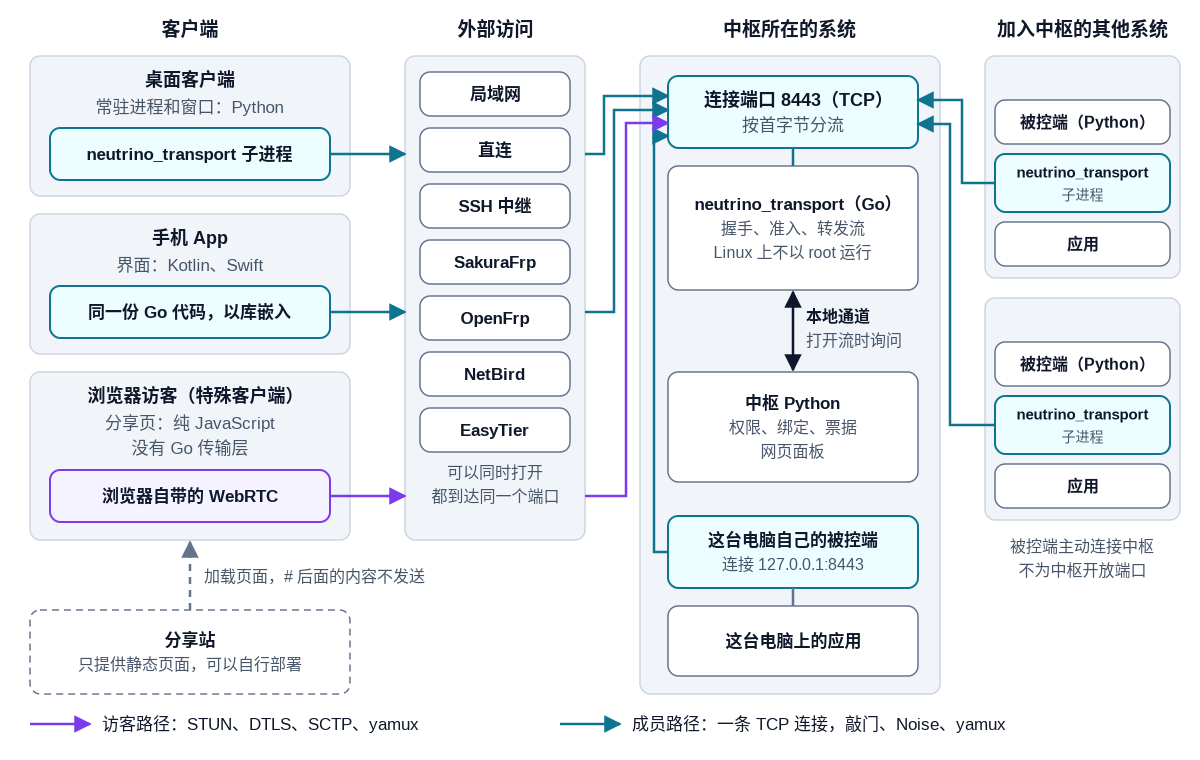
The connection layer is the Go module transport/. It runs in each place as follows:
| Place | How it runs |
|---|---|
| Hub | A separate process, neutrino_transport, that holds the connection port. On Linux it runs as the system account neutrino_transport, without root; on macOS and Windows it runs as root or SYSTEM |
| Agent, desktop client | A child process that the Python program starts |
| Android, iOS | The same Go code, embedded in the app as a library |
| Browser visitor | Runs no Go code. The share page is plain JavaScript, under 40 KB compressed, and the browser's built-in WebRTC makes the connection |
Each device keeps one TCP connection to the hub. The agent starts its connection to the hub, so its system opens no port for the hub and can be behind NAT.
A device connects to every hub address at the same time and keeps the connection that completes the handshake first.
The Go process only moves bytes, and Python manages permissions, tickets and bindings. The two communicate over a local channel: a Unix socket on Linux and macOS, a named pipe on Windows. The Go process sends Python one query when a session starts and one when each stream opens, and none while bytes flow. If Python does not reply in time, the hub rejects new connections, and streams already open are unaffected.
How port 8443 picks a path
The hub reads the first bytes of each connection and picks the path from them, so each connection keeps one protocol from its first byte.
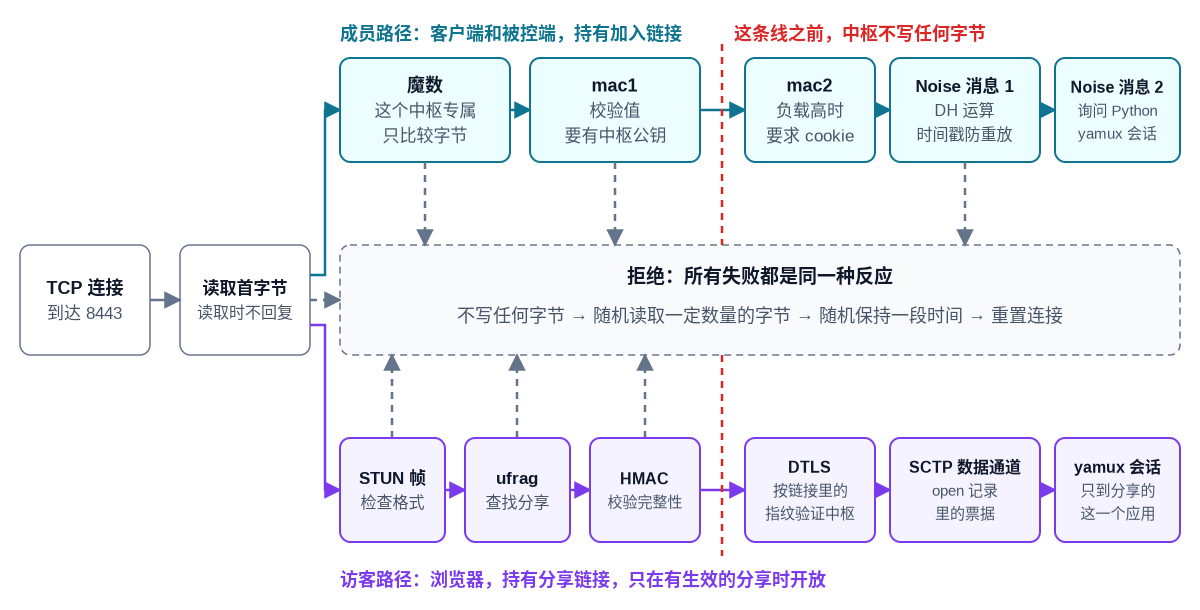
| First bytes of the connection | Path | Source |
|---|---|---|
| This hub's magic bytes | Member path: first message, Noise, yamux | Clients and agents |
| STUN Binding Request | Visitor path: DTLS, SCTP, yamux | Browsers, while a share is active |
| Anything else | Rejected | Scanners, wrong clients, TLS connections from 0.5 |
The magic bytes are derived from the hub's static public key, so each hub has different ones. They start differently from both STUN and TLS, so the first bytes are enough for the hub to distinguish the paths.
Browsers take a separate path because a web page cannot open a raw TCP connection. wss:// stops at a self-signed certificate, and the browser blocks ws:// inside an https page as mixed content. WebRTC's DTLS trusts the certificate fingerprint that the page provides, so it works without a domain or a certificate authority.
The visitor path works without a signaling server. The share page reads the hub's IP address, port, certificate fingerprint, ufrag, pwd and ticket from the part of the link after #. From these, the page writes the hub's side of the session description itself. Browsers do not send the part after # to the website.
The hub is ICE-lite and offers a single passive TCP candidate, the connection port. Shares therefore work over networks that drop UDP, over SSH relays and over frp tunnels.
Compiled to WebAssembly, the first message, Noise and yamux come to 1.7 MB compressed. The share page puts loading speed first, so the visitor path encrypts with the browser's built-in DTLS and proves access with the share's ticket.
First message and handshake on the member path
The member path uses the same Noise pattern as WireGuard, Noise_IKpsk2_25519_ChaChaPoly_BLAKE2s, with the same mac1, mac2 and cookie mechanism. It differs in running over TCP, because TCP works over the LAN, SSH relays, frp tunnels and virtual networks.
A device starts each connection with its first message. The hub checks the magic bytes in it, then mac1, and runs the Diffie-Hellman computation only after both pass. Computing mac1 requires the hub's public key, which only the join link contains, so a sender without the link fails at this step.
The handshake uses these credentials:
| Credential | What it is | Valid for | What the hub stores |
|---|---|---|---|
| Hub static key | A Curve25519 key pair; the public key is in the join link | Until you run nhub reset all | Only the transport process uses the private key |
| Ticket | Random, in the join link | 30 minutes, one use | SHA-256 |
| Device static key | A Curve25519 key pair that the device generates when it reads the link | Until the device leaves or the binding is deleted | The public key |
| Token | Random, returned after a successful join | The same as the binding | SHA-256, used as the PSK of every later handshake |
Every handshake proves both the device's static private key and its token. The device's private key exists only in its binding file, so the stored public key and token hash are not enough to impersonate it. The device verifies the hub with the public key from the link, so a server posing as the hub cannot complete the handshake.
The encrypted part of the first message holds a timestamp. The hub records the latest timestamp for each device public key and rejects a first message that is not newer. A captured first message that is replayed therefore gets no reply.
Each handshake uses new ephemeral keys, so a leaked long-term private key cannot decrypt old traffic. A session keeps its keys until it ends.
Scan protection
| Mechanism | Effect |
|---|---|
| The hub writes no byte until mac1 or the share's HMAC check passes | A sender without a link sees only TCP's own packets |
| The hub reads a random number of bytes from each connection before it rejects it | Nobody can guess the magic bytes one byte at a time from where the connection drops |
| The hub holds each connection for a random time before it resets it | Timing cannot distinguish wrong magic bytes, a wrong mac1 and a closed visitor path |
| Connections always close with RST | RST or FIN cannot reveal whether unread data remains |
| The first message and the reply have random-length padding | No fixed packet length marks the traffic |
| The visitor path is closed while no share is active | Without a share, a STUN connection gets the same reaction as any other wrong connection |
In lab tests, the hub returns no data to empty connections, random bytes, HTTP, TLS handshakes, wrong first messages or STUN matching no share. Packet captures show no packet with a payload, and nmap can only guess the service from the port number.
DoS protection
The following limits apply to the port as a whole. They do not count per source address, because through SSH relays and frp every connection comes from the loopback address.
| Resource | Limit | When the limit is reached |
|---|---|---|
| Connection slots | Connections not yet admitted have a total cap | The hub closes held rejected connections first, then the oldest unfinished handshakes, then the oldest connections |
| Memory | A held connection uses only the buffer for its first bytes; the hub stops reading, and TCP flow control stalls the sender | Each connection uses at most one kernel receive buffer |
| CPU | DH runs only after mac1 passes; concurrent handshakes have a cap | New connections close immediately, with no byte written |
| CPU under high load | When too many first messages are in progress, a valid mac2 is required | The hub sends a cookie reply and closes. The sender must prove that it can read what the hub writes to it, and cookies expire periodically |
| Admission time | The handshake and the whole admission each have a time limit | The connection closes |
| Join tickets | Too many wrong credentials in a short time | New joins pause, and bound devices connect as usual |
| Admitted sessions | The number of sessions and the streams per session have caps | New sessions or new streams are rejected |
| Stream memory | Each stream's window and the total memory of all streams have caps | The window stops growing, and the sender pauses |
| Frame size | Control frames and records have size caps | The session ends or the stream resets |
Scans and floods do not count as failed joins, because timeouts, wrong first messages and malformed data are not wrong credentials. This traffic therefore cannot pause the joining of your new devices.
In tests with bad connections filling every slot, a real agent finishes joining in under 1 second. A sender without a link receives no packet from the hub, so this path has no traffic amplification.
How data is relayed
This example follows a web app. The numbers in the diagram match the following steps:
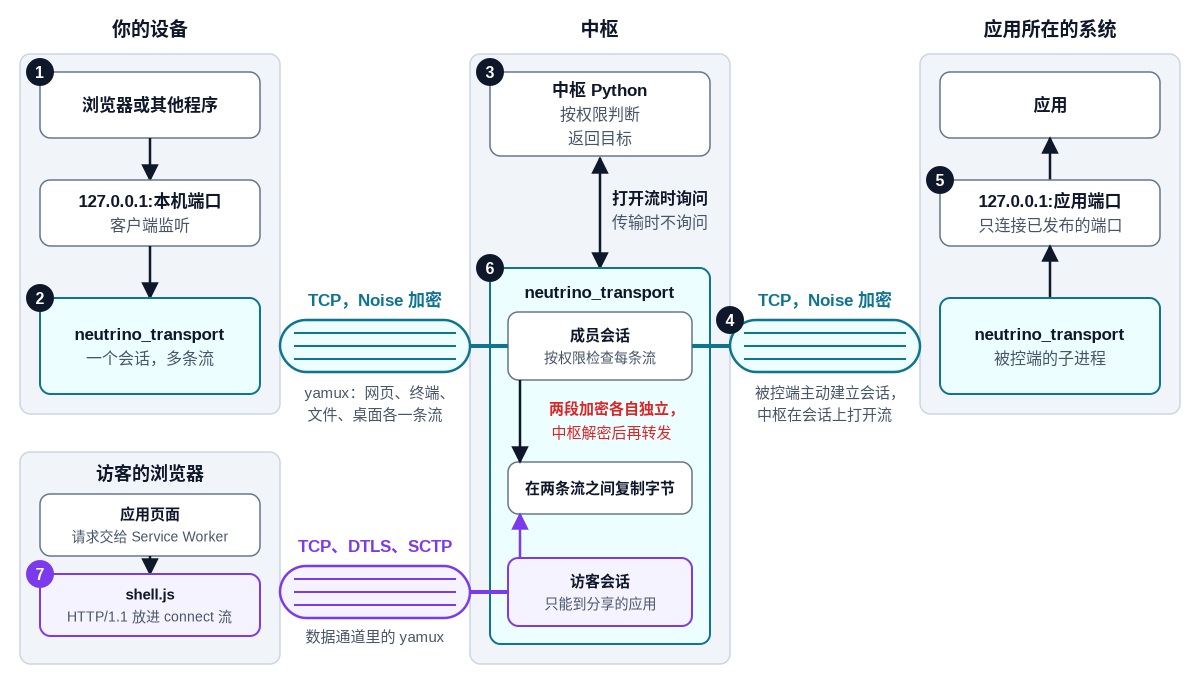
- The browser connects to the local port that the client listens on,
127.0.0.1:<local-port>. - The client's transport opens a yamux stream on the existing session, and the first record is
open {kind: connect, id}.idis the app's entry ID, and the record holds no address. - The hub's transport sends a query to Python. Python checks the kind, the system and the entry against this device's permissions, and takes the target from the hub's own records.
- The hub opens another stream on the session of the target system's agent.
- The agent confirms that the port is published, then connects to the app's port,
127.0.0.1:<app-port>. The agent rejects ports that are not published, so a fault in the hub's check still cannot open another port. - After both sides accept, the hub's transport copies bytes between the two streams and sends no more queries to Python.
- Visitor requests follow the same relay. The Service Worker passes the app page's requests to
shell.js, which writes them as HTTP/1.1 into aconnectstream in the data channel. A visitor session can open only the shared entry, and the hub closesshell,execandfilestreams immediately.
Device to hub and hub to agent are two separately encrypted segments, and the hub decrypts the data before it forwards it. At home and away, connections therefore follow one path and pass one set of permission checks.
When you withdraw a permission, the hub immediately closes the streams and sessions that it covers. The hub checks the next stream against the new permissions, and the device does not reconnect.
All streams share one TCP connection, which has these costs:
- When a packet is lost, every stream on this connection waits for the retransmission.
- At a 100 ms round trip, a 3 KB request takes 102 ms on an idle session. During a file copy, it takes 200 ms, and at most 300 ms.
Apps are not exposed directly
One design goal of Neutrino Hub is to keep apps from direct exposure on the network. Turning on an access method does not expose app bugs to strangers, for these reasons:
- Only the connection port faces outside: An access method opens only the connection port to outside networks, and the ports of the panel and the apps stay closed to them.
- Unauthorized clients cannot see it: The state that the hub sends a client lists only the apps its permissions allow. A client without authorization therefore has no such app on its Apps page.
- Unauthorized clients cannot open it: When a client requests the app's entry directly, the hub checks the permissions and rejects the request.
- Apps listen only on the local machine: The web apps that Neutrino Hub deploys listen only on
127.0.0.1, and the agent's forwarder accesses them. - A share link opens one app: A visitor with a share link can open only the shared app.
The following bypass the connection port and are outside this protection:
- Services you declare: These listen on their own addresses, so devices on the same network can connect to them directly. They rely on their own sign-in.
- Container ports bound to a LAN address on Linux: Devices on the same network can connect to them directly.
- File sharing on Windows and macOS: It uses the system's built-in SMB service, so devices on the same network can connect directly. It relies on account sign-in.
- Other services you run on the system yourself: The system firewall determines whether they are open to the outside.
Protocol 4 and protocol 3
0.6.0 uses protocol 4, and 0.5.2 uses protocol 3. The two are incompatible: a 0.5 device that connects to a 0.6 hub receives no data, so devices must join again after the upgrade. See Upgrade from 0.5.
| Item | Protocol 3 (0.5.2) | Protocol 4 (0.6.0) |
|---|---|---|
| Process on the hub | The panel's Python process | A separate Go process, without root on Linux |
| Encryption | TLS 1.2 or later | Noise_IKpsk2_25519_ChaChaPoly_BLAKE2s |
| Verifying the hub | The pinned SHA-256 fingerprint of the certificate | The static public key in the link |
| Verifying the device | A token sent in hello after the connection opens | The handshake proves the static private key and the token together |
| Under a scan | Anyone can complete the TLS handshake, and scan services can index the certificate | The hub writes no byte |
| Multiple streams | One WebSocket, each binary frame starting with a 4-byte stream ID | go-yamux |
| Window per stream | A fixed 1 MiB | Grows with the round-trip time |
| Browser visitors | Not supported | WebRTC |
The measured results are:
| Item | Protocol 3 | Protocol 4 |
|---|---|---|
| SMB download, 100 ms round trip | 4.7 MB/s | 25.8 MB/s |
| SMB upload, 100 ms round trip | 4.9 MB/s | 26.4 MB/s |
| SMB download, LAN | 243 MB/s | 433 MB/s |
| Hub CPU time per 1 GiB transferred, 100 ms round trip | 5.5 s | 2.1 to 2.8 s |
| code-server cold start to the first screen, 100 ms round trip | 5.85 s | 2.84 s |
| Hub memory | 137 MiB (the whole panel process) | 12 to 15 MiB (the transport process) |
The tests use three virtual machines on one host, which run the client, the hub and the agent. Each has 4 cores and 4 GiB of memory and runs Ubuntu 22.04. The test is a 2 GiB SMB copy, with the median of 3 runs and the round-trip delay simulated by netem. The protocol 3 column uses the same 1 MiB window as 0.5.2.
The single host limits the LAN results. Ubuntu's default TCP buffers limit the 100 ms results, and 0.6.0 leaves the system's TCP settings unchanged. Under the same conditions, plain TCP reaches about 30 MB/s.