
English
How it works
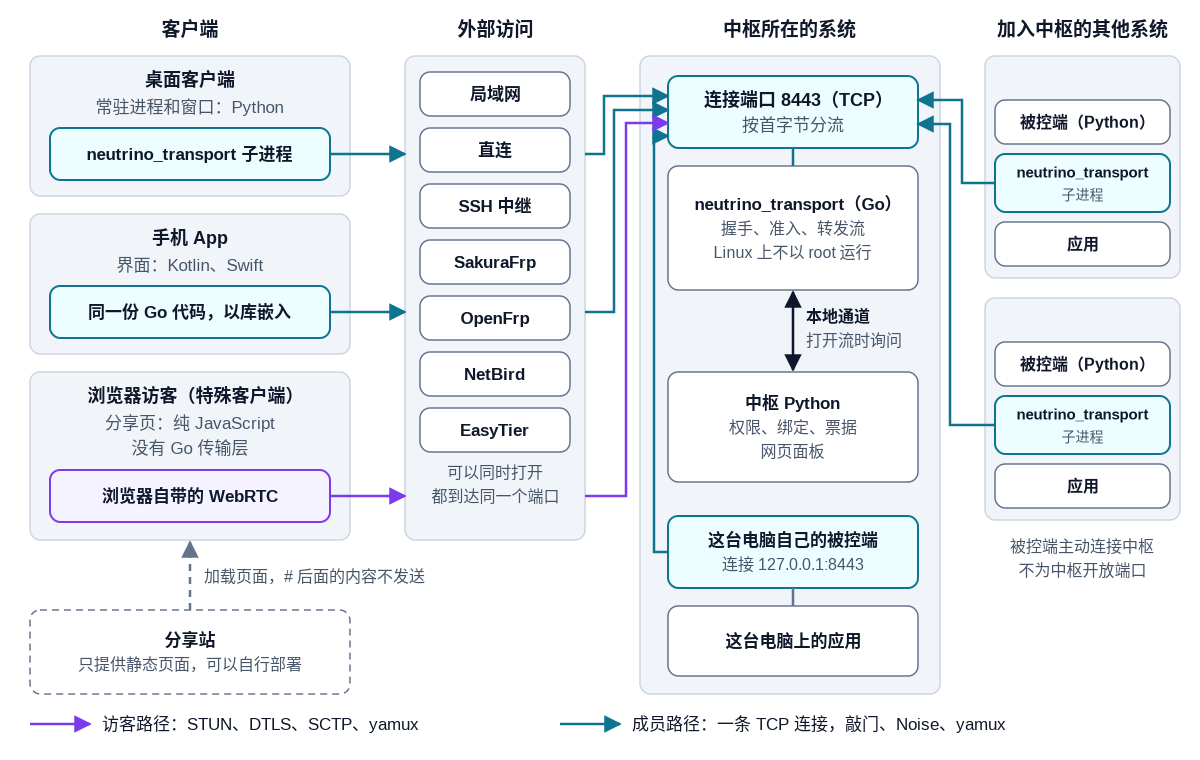
Each of your devices connects to a single port on the hub, and the hub connects it to an app after a permission check.
For the protocol, scan protection and DoS protection, see Security model.
Components
| Part | Runs on | What it does |
|---|---|---|
| Hub | One Windows, macOS or Linux computer that you choose | Serves the web panel, stores credentials, listens on the connection port, checks permissions and forwards connections |
| Agent | Every system that joined the hub, including the hub's own system | Installs and runs apps and reports their status. It starts the connection to the hub and opens no port for the hub |
| Client | Your computers and phones | Connects to the hub, lists the apps you have permission to use, and opens a local address that forwards to each app |
The hub stores both the panel configuration and its own. The hub writes each panel change to the configuration first, then generates each program's settings from it, and applies them last. A backup of the configuration directory therefore restores the whole hub.
Connection process
In this example, a phone opens CloudCLI on a computer:
- The phone connects to every hub address at the same time, including the LAN address and each access method you turned on. It keeps the route that completes the handshake first, so it switches routes automatically when the network changes.
- The hub checks the magic bytes at the start of the connection. If they do not match, the hub sends nothing back, so a scanner cannot identify the service.
- After the check passes, the phone and the hub complete a Noise handshake. The phone verifies the hub with the public key from the join link, and the hub verifies the phone against its stored record. Third-party routes see only ciphertext.
- After the handshake, yamux multiplexes many streams over this one TCP connection. Each use of a web page, port, terminal, file or remote desktop is a new stream.
- On the Apps page, you select Use, and the phone opens a local address that only the phone itself can access. Each entry keeps a fixed local port, so bookmarks keep working.
- You select Open, and the browser opens this address. The phone opens a stream to the hub, and the hub checks whether this phone has permission for the app.
- The hub connects to the system that runs the app. The agent's forwarder verifies the token and signs in to the app for you, so you do not type a password.
The hub forwards every stream, whether the device is on the LAN or outside it. Connections therefore follow one path and pass one set of permission checks.
Connection methods
Every connection method arrives at the same connection port, and the methods differ only in the path to it.
| Method | Path to the port | Requirement |
|---|---|---|
| LAN | The device connects directly to the hub's LAN address | The device and the hub are on the same network |
| Direct | The router forwards a port of the public address to the hub | Your internet connection has a public address |
| SSH relay | The hub connects to your VPS over SSH, and the VPS forwards a port to the hub | A VPS of your own |
| SakuraFrp, OpenFrp | The hub runs frpc, which connects to the provider's node, and the node forwards connections | An account |
| NetBird, EasyTier | The hub and the device join the same virtual network, and the device connects to the hub's address on that network | An account, or bootstrap peers you enter yourself |
Whatever the method, the device and the hub are the two ends of the encryption, so servers in between cannot read the content.
App share connection process
A visitor's browser has no client, so it takes a different path to the same port:
- The visitor opens the link, and the browser loads a static page from the share site. Browsers do not send the part of a link after
#to the website. - The page reads the hub's address and certificate fingerprint from the part after
#, then connects to the hub with the browser's WebRTC. - The hub reads the first bytes of the connection, identifies STUN and picks the visitor path. The browser verifies the hub by the fingerprint, the two set up DTLS encryption, and then they open a data channel.
- The page writes every web request of the app into this data channel, and the hub forwards the requests to the app. The visitor can open only this one app.
The share site serves only the page files and processes no content. You can also replace it with a site you deploy yourself.
Technology used
| Purpose | Technology |
|---|---|
| Encryption between devices and the hub | The Noise protocol |
| Many streams on one connection | go-yamux |
| Connections of browser visitors | WebRTC (STUN, DTLS, SCTP), implemented with pion |
| Connection layer | Go, one codebase shared by the hub, the agent and the three clients |
| Hub and agent | Python; the panel uses FastAPI and React |
| Phone apps | Kotlin on Android, Swift on iOS |
| Remote desktop | RustDesk |
| File sharing | Samba on Linux, the system's built-in sharing service on Windows and macOS |
| Containers | Podman, through WSL 2 on Windows and through the Podman machine on macOS |
| Access methods | NetBird, EasyTier, OpenSSH, frpc |
| AI gateway | CLIProxyAPI |
When a component stops
| What stops | Effect |
|---|---|
| The computer with the hub shuts down | Clients and share links cannot connect. Apps on other systems keep running and are available again after the hub computer starts |
| A system goes offline | The apps on this system do not open until it returns, and other systems are unaffected. After the system recovers, its apps open again |
| One access method fails | When the network changes or the client reconnects, the client automatically uses another access method you turned on |
| The share site is down | Newly opened share links load only after the share site recovers. You can also switch to a site you deploy yourself |